
Smart Fire Tape
Overview
Section titled “Overview”The Smart Fire Tape tool eliminates the tedious, error-prone process of manually drawing 2D detail lines for fire ratings on your architectural plans. By reading your actual wall parameters, it automatically drafts perfect 2D lines, symbols, and tags that dynamically respect core boundaries, structural joins, and real-world rough openings.
Every fire tape generated is embedded with intelligent tracking metadata. This ensures that as your model evolves, you can seamlessly update existing tapes to reflect new ratings or wall movements—all while preserving any granular, manual modifications you’ve explicitly pinned in place.
Interface Breakdown
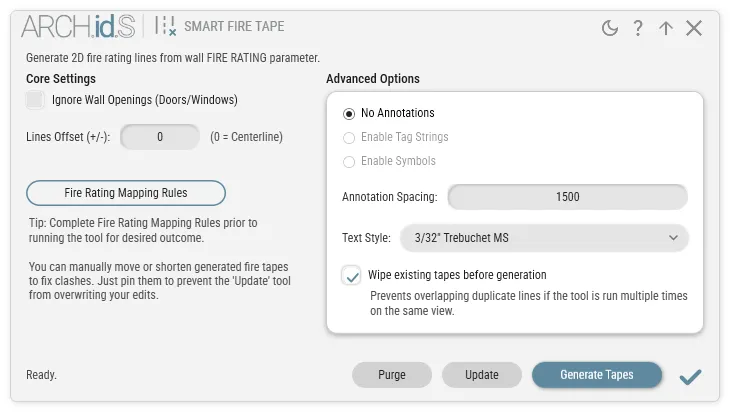
Section titled “Interface Breakdown”1. Core Settings
Section titled “1. Core Settings”- Ignore Wall Openings: When checked, fire tape lines will draw continuously straight through doors, windows, and other inserts. When unchecked, lines intelligently pause and resume precisely at the edges of the rough opening.
- Lines Offset (+/-): By default, lines are drawn precisely along the center of the wall core. Enter a positive or negative structural offset (e.g.,
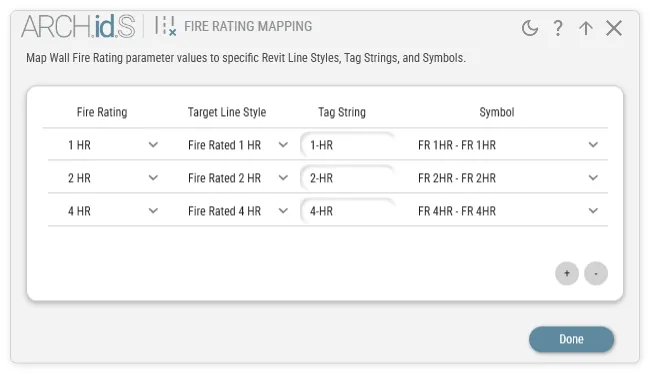
-200) to physically push the tape left or right away from the center. - Fire Rating Mapping Rules: Click to open the centralized mapping database. Here, you define exactly which
Line Style,Tag String, andSymbolshould be assigned to any givenFire Ratingvalue detected in your project (e.g., mapping a “2 HR” parameter to a specific dash-dot Line Style and Diamond symbol).
2. Advanced Annotation Options
Section titled “2. Advanced Annotation Options”The engine features mutually exclusive annotation controls to configure how lines are tagged:
- No Annotations: Only draws the bare Line Styles without text or symbols.
- Enable Tag Strings / Enable Symbols: Activates text or family instances along the line segments.
- Annotation Spacing: Defines the linear interval between repeated tags or symbols.
- Text Style: Searchable dropdown to map your preferred font and text size for generated Tag Strings.
3. Generation & Maintenance
Section titled “3. Generation & Maintenance”- Wipe existing tapes before generation: Automatically detects and purges any unpinned legacy tapes previously generated by the tool in your active view, preventing duplicate line overlaps if you decide to iterate multiple configurations.
💡 Architect’s Tips & Behavior Guide
Section titled “💡 Architect’s Tips & Behavior Guide”- The Pin Rule (Protecting Overrides): We understand that sometimes an annotation needs to be nudged slightly for graphical clarity. The Pin Rule ensures your manual overrides are completely protected. If you manually move or shorten a generated fire tape or tag to fix a clash, simply
Pinit in Revit. The tool’s Update and Purge mechanisms will permanently ignore any pinned tapes, preserving your granular graphical decisions. - Perfect Corner Mitering: The tool automatically cleans up complex wall joins. Regardless of odd angles or applied offsets, neighboring tape segments are seamlessly trimmed and extended to form perfectly sealed corner vertices, eliminating tiny gaps.
- Dynamic Annotation Scaling: The engine smartly analyzes your assigned Tag Strings and Symbols prior to placement. If a wall segment is too short to comfortably host a specific symbol or text block, the annotation is intelligently skipped to prevent awkward graphic overlaps.
- Update Workflows: If a user modifies a wall’s Fire Rating parameter, or shifts the wall itself, simply run the tool and click Update. The smart engine will strictly modify the affected tapes without needlessly wiping out and regenerating the entire view.